


An amazing feature in iPhone 5
is that you can watch
streaming videos and movies on it. It is amazing to watch your favorite videos while travelling, enjoying
picnic far from your home and enjoying the gathering of your friends. You just
need to access YouTube
to watch the latest movies of your choice. It is a
great feature for the movie lovers. You can watch documentaries and your
favorite shows on your iPhone 5
now.
You can download a wide range
of apps to access the latest movies and even you can rent movies or can purchase them from iTunes. If you rent a movie, you would be able to save
it for only thirty days and once you have started watching the movie, you need to finish it within the next
twenty-four hours.
Moreover, you can access YouTube to watch your
desired videos and even it is easy for you to convert DVDs into MP4
files for your iPhone 5. Here, you will see the
steps to view the videos you have bought from iTunes.
Steps to View Movies Bought from iTunes in iPhone 5
- Open iTunes on your iPhone 5.
- Click on the icon named “Video” that can be seen in the lower part of the screen.
- Select the video or documentary you intend to buy.
- Click on the button “Buy” and use your Apple ID and Password to complete the process of purchasing.
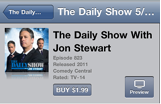
- Once you have downloaded the video, you need to click the “Purchased” link to open the video.
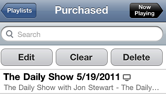
- Here, on the “Purchased” screen you need to click the video you intend to watch.
- So, the process is complete now and you can watch your desired video on your iPhone 5.


 Posts
Posts


0 comments:
Post a Comment